
AIWriteBook Review 2026: Is This AI Book Writer AppSumo Deal Worth It?
Introduction: Can AIWriteBook Really Take You From an Idea to a Published Book?
AIWriteBook is currently featured as part of AppSumo’s AI Week, making it a timely opportunity to grab the tool at a special lifetime deal price. This is a limited-time deal.
Writing a book involves much more than generating thousands of words.
Authors have to research ideas, develop characters, build an outline, maintain consistency across chapters, edit the manuscript, create a cover, format the book, write a sales description, research keywords, and prepare files for publishing.
AIWriteBook attempts to bring many of those jobs into a single AI-powered workspace.
According to its current AppSumo listing, the platform is designed for both fiction and nonfiction authors and can help create chapter outlines, develop characters, generate full chapters, match an author's writing style, produce illustrations and covers, and export finished books in publishing-friendly formats.
The bigger question for anyone considering the AIWriteBook AppSumo lifetime deal is whether all those capabilities make it genuinely useful—or simply another AI writing generator.
This detailed AIWriteBook review examines its features, workflow, credit system, pricing, strengths, limitations, KDP capabilities, and the types of writers most likely to benefit from it.
What Is AIWriteBook?
AIWriteBook is an all-in-one AI book writing and publishing platform designed to move a project from initial concept to a finished manuscript.
Instead of functioning like a conventional chatbot where an author repeatedly prompts the AI chapter by chapter, AIWriteBook provides a structured workflow specifically designed around long-form book creation.
The system supports both new projects and existing manuscripts. Authors can upload drafts, notes, or partial books and continue developing them inside the platform. Supported import formats include DOC, DOCX, PDF, EPUB, RTF, TXT, and Markdown.
AIWriteBook's official site says the platform can handle books of up to 500 pages while incorporating outlining, characters, covers, illustrations, audiobook narration, and publishing exports.
In other words, it is trying to replace several different tools normally used during the self-publishing process.
How AIWriteBook Works
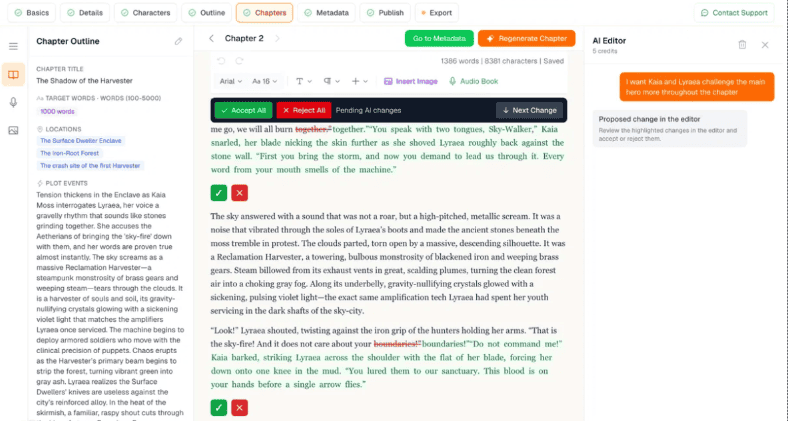
The AIWriteBook workflow can broadly be divided into four stages.
1. Start With an Idea or Existing Manuscript
You can begin by describing your book concept or uploading material you have already written.
For fiction, AIWriteBook can help develop:
-
Characters
-
Backstories
-
Character arcs
-
Settings
-
Plot structures
-
Chapter sequences
-
Story beats
For nonfiction, it can organize information into:
-
Chapters
-
Lessons
-
Exercises
-
Reflections
-
Action steps
-
Key takeaways
You aren't locked into the AI's first suggestion. Outlines and structural elements can be edited or regenerated as the book develops.
This is particularly useful for writers who already have plenty of ideas but struggle to turn those ideas into a coherent book structure.
2. Generate Full Chapters With AI
Once your outline is established, AIWriteBook can turn individual sections into complete chapters.
The important differentiator is its AI writing style builder.
Rather than relying only on instructions such as “write casually” or “sound professional,” authors can upload examples of their previous writing. AIWriteBook uses those samples to adapt generated chapters to the author's existing style.
You can then:
-
Edit paragraphs directly
-
Regenerate sections that aren't working
-
Use AI chat for chapter-specific help
-
Run grammar and style checks
-
Review consistency across the manuscript
For authors concerned about generic-sounding AI prose, this voice-matching approach may be one of AIWriteBook's most valuable features.
Human review remains essential, however. Voice matching can guide AI output, but authors should still edit generated text for originality, factual accuracy, pacing, nuance, and consistency.
Character Builder and Story Planning
Long-form fiction creates a problem that short AI prompts rarely solve well: continuity.
A character introduced in chapter two needs to remain recognizable in chapter twenty. Motivations, physical traits, relationships, locations, and story events all need to remain consistent.
AIWriteBook addresses that challenge with a dedicated character builder and chapter outline system.
The AppSumo listing says writers can create characters with defined traits, histories, and story arcs before generating prose. The chapter planner then establishes the larger progression of the story.
This approach is much better suited to novels than simply asking a general AI chatbot to “continue the story.”
Potential uses include:
-
Romance novels
-
Fantasy series
-
Mystery and thriller books
-
Science fiction
-
Children's stories
-
Serialized fiction
-
Multi-book series
For nonfiction, the same structural approach can be applied to business books, instructional guides, self-help books, educational material, cookbooks, and professional authority-building books.
AI Writing Style Matching
The writing-style system deserves special attention because it addresses one of the biggest objections authors have to AI-generated writing.
Generic AI content often feels polished but strangely anonymous.
AIWriteBook lets writers provide examples of their own work so the system can adapt future chapters to their established voice. According to the AppSumo FAQ, uploaded writing is used to help generated chapters remain consistent with the author's style.
That could be especially useful for:
Existing authors: Maintaining consistency with previously published books.
Series writers: Keeping prose style similar across multiple installments.
Experts and coaches: Transforming existing articles, workshop materials, transcripts, or notes into books without completely losing their natural tone.
First-time authors: Developing a consistent style instead of prompting an AI differently for every chapter.
The feature shouldn't be viewed as automatic authorship. The better approach is to use AI-generated chapters as material that you continue refining.
AIWriteBook for Nonfiction Authors
AIWriteBook isn't limited to novels.
Its nonfiction workflow allows authors to incorporate references and citations while organizing information into structured educational material.
That makes the platform potentially useful for:
-
Business books
-
Marketing guides
-
Coaching books
-
Self-help content
-
Educational ebooks
-
Professional handbooks
-
How-to guides
-
Cookbooks
-
Thought-leadership books
For example, a consultant with several years of blog posts, webinar transcripts, and presentations could import that material, organize it into a book outline, expand individual concepts, and create a more cohesive manuscript.
Authors should still independently verify references, quotations, statistics, and factual claims before publication. AI-generated research can contain errors, and publishing doesn't remove the author's responsibility for accuracy.
Create Book Illustrations With AI
AIWriteBook also includes an AI illustration generator.
According to the AppSumo listing, authors can generate chapter illustrations and maintain visual consistency across pages. It also supports creating illustrations alongside book text within the same workspace.
This could be particularly attractive for:
-
Children's books
-
Illustrated guides
-
Recipe books
-
Educational books
-
Fantasy books
-
Visual storytelling
-
Coloring or activity books
Creating consistent characters is traditionally a challenge with standalone AI image generators because repeated prompts can produce noticeably different appearances.
AIWriteBook specifically positions its illustration workflow around maintaining greater character consistency throughout a project.
Built-In AI Book Cover Designer
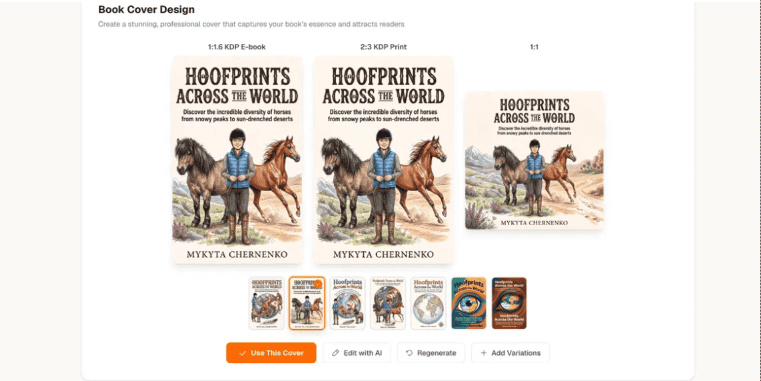
After finishing a manuscript, you still need a cover.
AIWriteBook includes a Cover & Illustration Studio that can generate multiple cover concepts rather than forcing authors to move the project into another design tool.
The AppSumo FAQ says users can generate professional-style book covers and request additional variations until they find a suitable visual direction.
That doesn't necessarily eliminate the value of a professional cover designer—especially for highly competitive commercial genres—but it could dramatically simplify prototyping or producing books with modest design budgets.
KDP Publishing Tools
One of AIWriteBook's strongest selling points is that the workflow doesn't stop when your manuscript is finished.
Its publishing tools include:
-
KDP keyword research
-
Book blurb generation
-
Category selection
-
Metadata preparation
-
EPUB export
-
PDF export
-
DOCX export
The platform says exported files can be used for Amazon KDP as well as other publishing ecosystems such as Apple Books and Kobo.
Amazon currently supports EPUB among its accepted ebook manuscript formats and recommends validating EPUB files with Kindle Previewer before publishing.
So even when using a “KDP-ready” export, reviewing and previewing the final book before publication remains a sensible final step.
Important: Amazon's Rules for AI-Generated Books
Anyone using an AI book generator for Amazon publishing should understand one particularly important requirement.
Amazon KDP currently distinguishes between AI-generated and AI-assisted content.
Amazon states that publishers must disclose AI-generated text, images, or translations during the publishing process. If AI merely helps with brainstorming, editing, refining, or checking material ultimately created by the author, Amazon categorizes that differently as AI-assisted content and does not currently require the same disclosure.
That distinction matters for AIWriteBook users because the platform can create actual manuscript text, covers, illustrations, and translations.
Authors planning to publish AIWriteBook-generated material should therefore review Amazon's latest content guidelines before uploading their books.
Write Books in More Than 30 Languages
International publishing is another interesting part of the platform.
Both the AppSumo listing and AIWriteBook's website state that the system supports 30+ languages. Authors can create books natively in supported languages rather than drafting everything in English first.
The platform also offers book translation capabilities.
This opens several potential strategies for independent publishers:
-
Publish localized editions
-
Translate successful books into new markets
-
Create multilingual nonfiction
-
Produce localized children's books
-
Generate audiobook editions in additional languages
Translation still deserves native-speaker proofreading before publication, particularly for fiction, humor, cultural references, and specialized technical content.
Turn Your Book Into an Audiobook
AIWriteBook also includes audiobook generation.
Its official site says finished books can be converted into narrated audio using multiple voices and supported languages.
This is convenient because audiobook production normally requires yet another platform after manuscript completion.
However, audiobook creation is where users should pay particularly close attention to AIWriteBook's credit system, because audio generation consumes credits based on character count.
For long books, this could require significantly more credits than simply generating written chapters.
AIWriteBook Credit System Explained
The AppSumo deal provides lifetime access, but AI usage is controlled through monthly credits.
At the time of this review, the AppSumo FAQ lists examples such as:
-
Chapter outline: 3 credits
-
Full chapter with Gemini: 15 credits
-
Full chapter with Grok: 20 credits
-
Full chapter with Claude: 30 credits
-
AI chat edit: 5 credits
-
Illustration: 15 credits
-
Image edit: 15 credits
-
Visual book page: 20 credits
-
Book cover: 30 credits
References, text-analysis tools, translation, audiobook generation, and other actions can also consume credits.
This is arguably the most important detail to understand before buying.
“Lifetime access” does not mean unlimited AI generation.
You keep access to the software, while the amount of AI processing available each month depends on your license tier.
AIWriteBook AppSumo Pricing
Pricing checked August 10, 2026. AppSumo deals can change, so confirm the current offer before purchasing.
The listing currently shows four lifetime licenses:
| Plan | Lifetime Price | Monthly Credits |
|---|---|---|
| License Tier 1 | $79 | 500/month |
| License Tier 2 | $159 | 1,000/month |
| License Tier 3 | $299 | 2,500/month |
| License Tier 4 | $499 | 5,000/month |
Tier 2 is marked as the recommended option on the current AppSumo listing.
The deal terms state that Tier 1 is associated with the product's Plus plan, while Tiers 2 through 4 receive updates associated with its Pro plan. AppSumo also lists a 60-day refund window and requires license activation within 60 days.
Because feature availability and deal terms may change, check the live plan comparison before selecting a tier.
Which AIWriteBook Tier Should You Choose?
Tier 1: Best for Experimenting
The 500-credit plan could work for a writer creating books occasionally or someone primarily interested in experimenting with the platform.
It may become restrictive if you frequently regenerate chapters, produce lots of artwork, translate books, or create audiobooks.
Tier 2: Better for Regular Authors
With 1,000 monthly credits, Tier 2 provides considerably more room for chapter generation, editing, and visual experimentation.
It is also the tier AppSumo currently highlights as its recommended option.
Tier 3: Better for Serious Self-Publishers
Writers producing multiple books or regularly creating illustrated content may benefit from the 2,500-credit allowance.
Tier 4: Best for High-Volume Publishing
The 5,000-credit tier makes more sense for prolific writers, small publishers, or creators who expect to use expensive features such as illustrations and audiobook generation regularly.
Rather than simply buying the largest tier, estimate how many chapters, revisions, covers, images, translations, and audio projects you realistically expect to produce each month.
Who Is AIWriteBook Best For?
The AppSumo listing specifically identifies authors, freelancers, and solopreneurs as key audiences.
In practice, AIWriteBook appears particularly well suited to:
First-Time Authors
The guided workflow removes some of the uncertainty around turning an idea into an outline, chapters, and finally a publishable file.
Independent KDP Publishers
Built-in metadata, keywords, blurbs, covers, formatting, and export tools can reduce the number of separate applications required.
Fiction Authors
Character development, plot planning, chapter outlining, and style matching make the product more book-oriented than a basic AI chatbot.
Nonfiction Experts
Coaches, consultants, entrepreneurs, educators, and professionals can potentially transform existing expertise into structured books.
Children's Book Creators
Integrated text, illustration, and cover generation provides a particularly interesting workflow for illustrated publishing.
Prolific Authors
Writers producing multiple titles can benefit from having research, drafting, design, metadata, and publishing tools inside one environment.
AIWriteBook Pros and Cons
Pros
All-in-one workflow: Writing, outlining, editing, illustrations, covers, metadata, and exports are integrated into one platform.
Voice matching: Authors can provide existing writing samples to guide the generated style.
Fiction and nonfiction support: The system isn't limited to one publishing category.
Existing manuscript import: Writers don't have to abandon a project they've already started.
KDP-oriented publishing features: Metadata, keywords, blurbs, and export tools reduce post-writing work.
30+ languages: Useful for multilingual authors and publishers targeting international markets.
Multiple export formats: EPUB, PDF, and DOCX provide flexibility.
Lifetime AppSumo option: A one-time purchase can be more attractive than maintaining another monthly software subscription.
Cons
Credits are not unlimited: Heavy users can quickly consume their monthly allocation, particularly with premium AI models, artwork, translation, or audiobooks.
Human editing remains necessary: AI-generated manuscripts should never be assumed to be publication-ready purely because the software can export them.
Research requires verification: Nonfiction authors should verify citations, claims, and statistics themselves.
AI publishing rules matter: KDP requires disclosure of AI-generated content under its current content guidelines.
The AppSumo listing is still new: At the time this article was researched, the AppSumo product page displayed no customer reviews, meaning there is not yet a substantial body of AppSumo-specific buyer feedback to evaluate.
AIWriteBook vs. Using a General AI Chatbot
Why pay for dedicated AI book writing software when conversational AI can already produce text?
The difference is primarily workflow and persistence.
With a general chatbot, authors typically have to manually manage:
-
Book concepts
-
Characters
-
Chapter outlines
-
Prompt history
-
Style instructions
-
Manuscript files
-
Images
-
Cover design
-
Formatting
-
Publishing metadata
AIWriteBook attempts to package those steps into a single book-centered system.
That doesn't necessarily mean its underlying generated prose will always outperform every other AI model.
Its advantage is that the surrounding infrastructure has been designed specifically for authors.
For writers who regularly publish books, workflow efficiency can be as important as the quality of raw text generation.
Is AIWriteBook Suitable for Publishing Complete Books?
Yes—but with one major qualification.
AIWriteBook provides many of the tools required to create a complete book, and its exported EPUB, PDF, and DOCX formats align with common publishing workflows. Amazon KDP accepts EPUB and other supported manuscript formats for ebook publication.
However, “publish-ready” software should not be interpreted as permission to publish blindly.
Before releasing an AI-assisted book, authors should:
-
Read the complete manuscript.
-
Rewrite generic or repetitive passages.
-
Fact-check nonfiction claims.
-
Verify citations and references.
-
Check character and timeline continuity.
-
Proofread grammar and punctuation.
-
Check image rights and quality.
-
Preview the final EPUB or print file.
-
Confirm publishing metadata.
-
Follow the marketplace's latest AI disclosure requirements.
The most effective use of AIWriteBook is likely AI plus human authorship, rather than completely automated publishing.
AIWriteBook Review: Final Verdict
AIWriteBook stands out because it isn't trying to solve only the first 20% of the book-creation process.
It combines AI book writing, character development, outlining, style matching, editing, illustrations, book covers, audiobooks, KDP metadata, and publishing exports into a single environment.
For self-publishers who currently move between several tools to create each book, that consolidation could be the platform's biggest advantage.
The voice-matching feature is particularly interesting for established authors, while the structured workflow could help first-time writers turn scattered ideas into something resembling an actual manuscript.
The biggest factor to evaluate before buying the AIWriteBook AppSumo deal is not the feature list—it is the monthly credit allowance. Chapter generation, premium models, illustrations, translations, edits, and audiobooks all consume credits, so frequent publishers should choose their license tier based on expected usage rather than simply choosing the cheapest plan.
For authors, coaches, solopreneurs, children's book creators, and KDP publishers who want an integrated book-production workflow, AIWriteBook is certainly worth investigating.
Just remember that AI can accelerate the writing and publishing process; it shouldn't replace editorial judgment.
If you've been sitting on a book idea because the writing, formatting, design, and publishing process feels overwhelming, AIWriteBook may provide a practical way to finally move that project from idea to manuscript—and from manuscript to marketplace.
Frequently Asked Questions
Is AIWriteBook a complete AI book generator?
Yes. It can assist with book planning, character creation, chapter outlining, full chapter generation, editing, illustrations, covers, and publishing exports.
Can AIWriteBook write fiction?
Yes. Its fiction tools include character development, plot planning, chapter outlining, and long-form prose generation.
Can AIWriteBook create nonfiction books?
Yes. The platform supports nonfiction structure, references, citations, exercises, reflections, and other educational elements.
Can I upload an existing manuscript?
Yes. Supported import formats include DOC, DOCX, PDF, EPUB, RTF, TXT, and Markdown.
Does AIWriteBook create book covers?
Yes. It includes AI-powered cover generation and interior illustration tools.
Does AIWriteBook support Amazon KDP?
The platform includes KDP-focused metadata tools and can export EPUB, PDF, and DOCX files. Amazon currently supports EPUB and other applicable manuscript formats through KDP.
Does AIWriteBook offer lifetime access?
The current AppSumo deal offers lifetime licenses across four tiers, ranging from $79 to $499 at the time this review was researched. Monthly credit limits vary by tier.
Are AIWriteBook generations unlimited?
No. AI-related actions consume credits, with different tasks and AI models requiring different amounts.
Can I publish AI-generated books on Amazon?
Amazon permits AI-generated content subject to its content policies, but currently requires publishers to disclose AI-generated text, images, or translations during the publishing process.
DISCLOSURE: THIS POST MAY CONTAIN AFFILIATE LINKS, MEANING I GET A COMMISSION IF YOU DECIDE TO MAKE A PURCHASE THROUGH MY LINKS (AT NO COST TO YOU)